TrainingZones.io MCP server for Claude and ChatGPT
Give your AI assistant your training calculators and guides. Paste one URL, and it computes your zones and quotes the site's articles, sourced, in your language.
Connector URL
https://www.trainingzones.io/api/mcp- No account, no API key
- Free, and it stays free
- Answers in 6 languages
What your assistant can do with it
The connector adds 34 tools to your assistant: every TrainingZones.io calculator, plus the site's training guides. It never invents an answer: it computes, or it quotes a published article with its link.
30 calculators
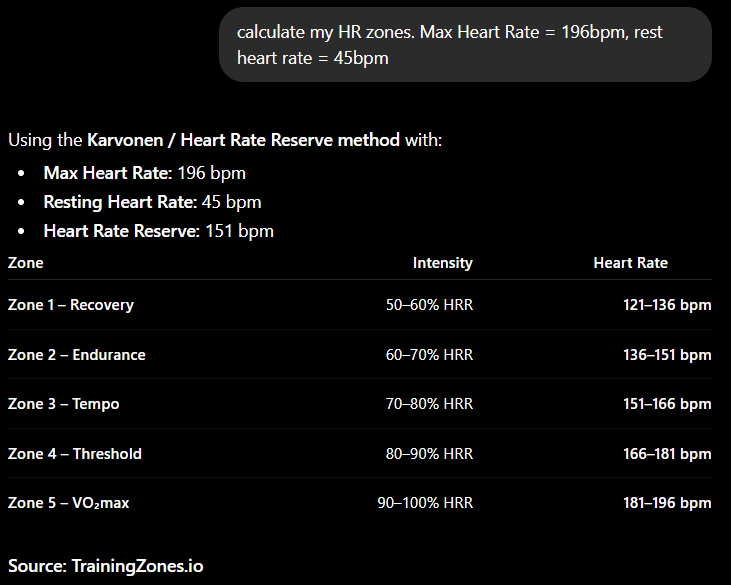
Heart rate zones, FTP, CSS, VMA, critical power, race predictions, nutrition, sweat rate and more. The same formulas as the site.
36 training guides
Ask a question and get real passages from the site's articles, each dated and linked to the exact section. If a subject is not covered, it says so.
Things to ask, once it is connected
- My max heart rate is 190 and my resting heart rate is 52. What are my training zones?
- What is the 80/20 rule, and does it work on three hours a week?
- I swam 400m in 6:30 and 200m in 3:05. What is my CSS pace?
- How should I adapt my training in the heat?
Connecting it, in two minutes
In Claude
- 1Open Claude, in your browser or in the desktop app.
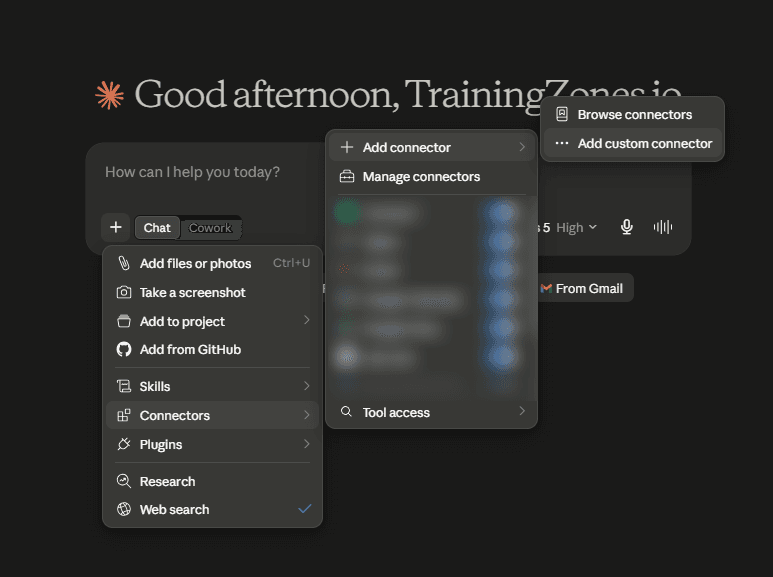
- 2In the message box, click the + button, then Connectors.
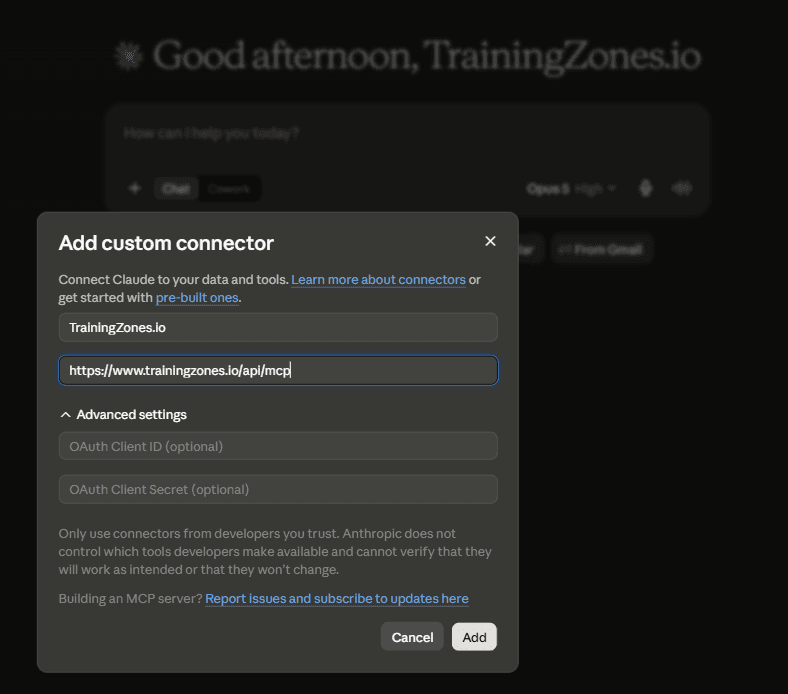
- 3Click Add connector, then Add custom connector.
- 4Give it a name (TrainingZones.io), paste the URL above, and click Add.
- 5Claude will ask for permission the first time it uses a tool.
Works on the free plan. Nothing to install, nothing to sign up for.
In ChatGPT
- 1Open the ChatGPT settings, then Security and login.
- 2Turn on Developer mode, which is what allows custom connectors.
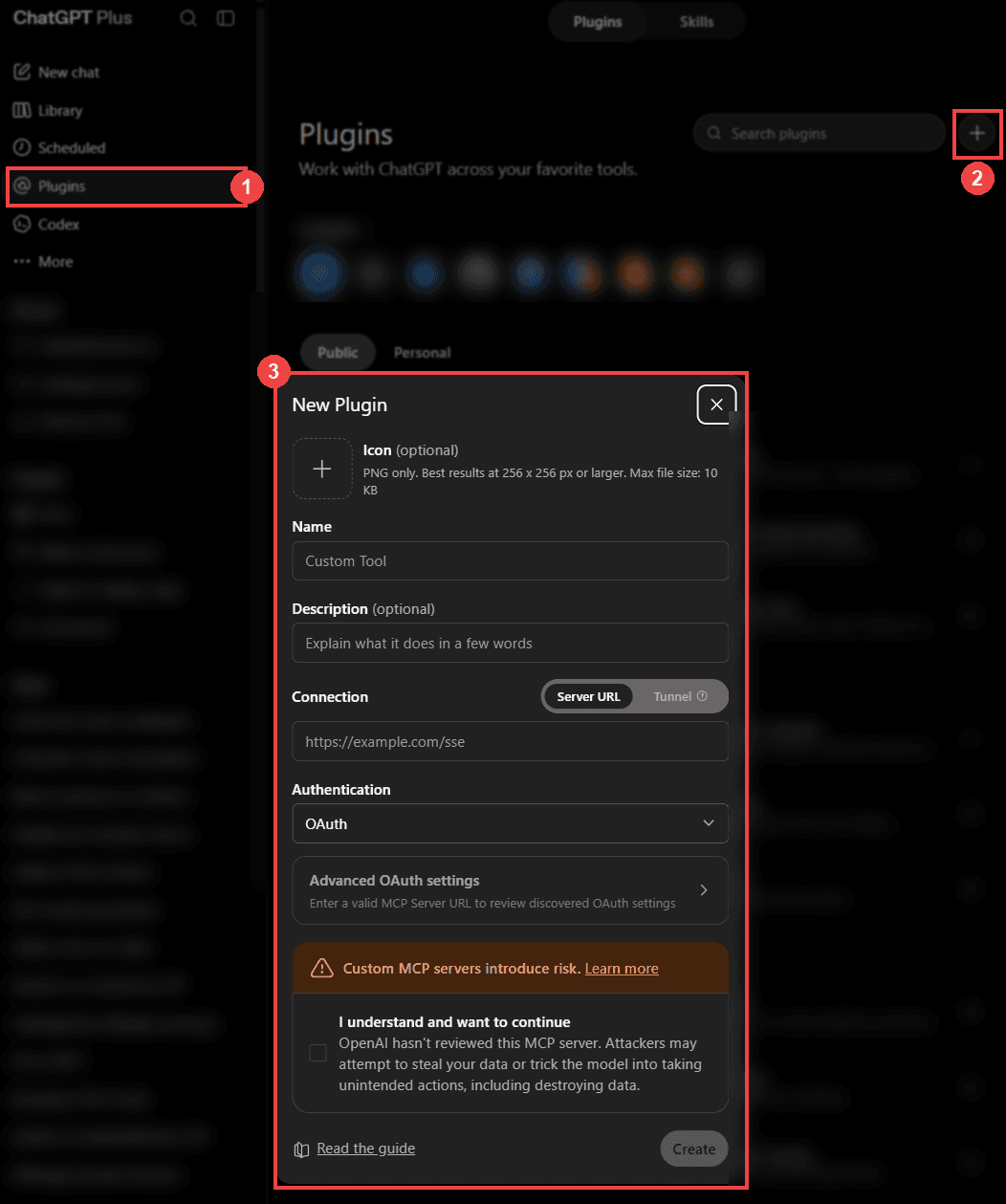
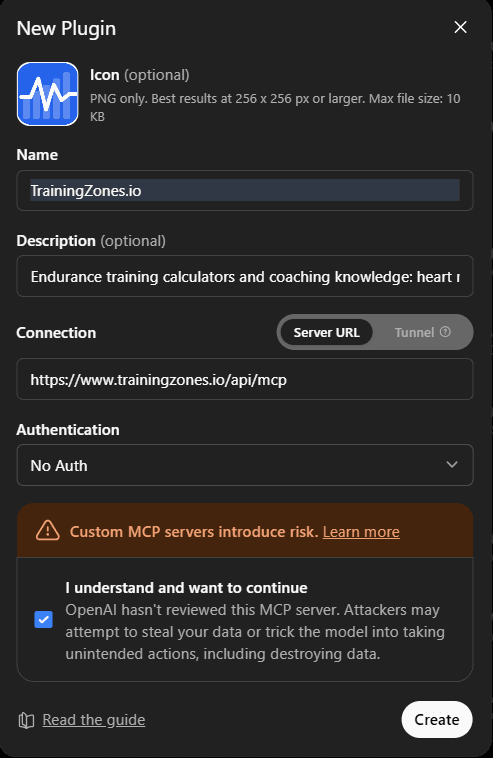
- 3Go back to the settings, open Plugins, and click the + button in the top right.
- 4Name it TrainingZones.io, paste the URL above into Server URL, leave Authentication on No Auth, tick the confirmation box, then click Create.
- 5In a conversation, pick the connector to use it.
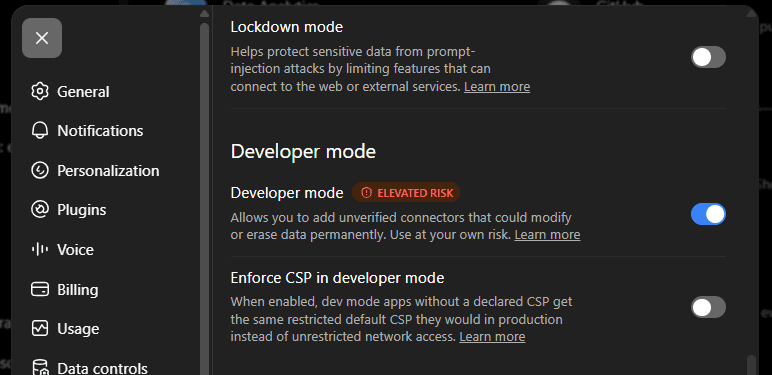
Developer mode is not available on every plan. If you do not see it, the connector still works in Claude.
Setting it up from a config file
Some clients have no connector menu and read a JSON file instead: the advanced config of Claude Desktop, Cursor, VS Code, Windsurf. Add this, restart the client, and the tools appear.
{
  "mcpServers": {
    "trainingzones": {
      "command": "npx",
      "args": ["mcp-remote", "https://www.trainingzones.io/api/mcp"]
    }
  }
}
There is no API key to fill in. The server is public, so if a client asks for one, leave it empty.
If it does not work
- The connector never shows as connected: check the URL ends with /api/mcp, with nothing after it.
- The assistant answers without using it: ask explicitly, for example "use TrainingZones.io to work out my zones". Some clients only reach for a tool when the question clearly needs one.
- You get a message about too many requests: the server allows 120 calls a minute per address. Wait a minute and carry on.
- ChatGPT shows no developer mode: it is not on every plan. The connector works in Claude on the free plan.
- A client asks for an API key: leave it empty. There is no account and no key to create, and in Claude the OAuth fields under Advanced settings stay empty too.
Frequently asked questions
- Is the TrainingZones.io MCP server free?
- Yes. No account, no API key, no paid tier. It reads public content from the site, which is why it costs nothing to run and nothing to use.
- What is an MCP server?
- MCP, the Model Context Protocol, is a standard way to give an AI assistant access to outside tools. An MCP server is what sits at the other end. Ours exposes the TrainingZones.io calculators and training guides so an assistant uses them instead of guessing.
- Does it work in my language?
- Yes, in English, French, German, Italian, Spanish and Portuguese. Ask in your language: the guides are served already written in it, not machine translated, and the links point to that version of the page.
- Is my training data sent anywhere?
- No. Nothing is stored. The numbers you give your assistant are used to compute an answer and are not kept, and the server has no account to attach them to.
- Why use this instead of just asking the assistant?
- Because an assistant on its own answers from memory, with no source. Through the connector it computes with the site’s own formulas and quotes real published passages, with a link and a date, so you can check what it told you.
Rather use them in your browser?