What Is a Cycling Power Meter?
A cycling power meter is a device that measures your power output in watts by calculating torque multiplied by cadence. Unlike heart rate, which reacts with a 30 to 60 second delay and is affected by heat, caffeine, and fatigue, power provides an instant, objective measure of how hard you are actually pedaling. According to Coggan and Allen (2019), power is the single most valuable training metric in cycling because it eliminates guesswork.
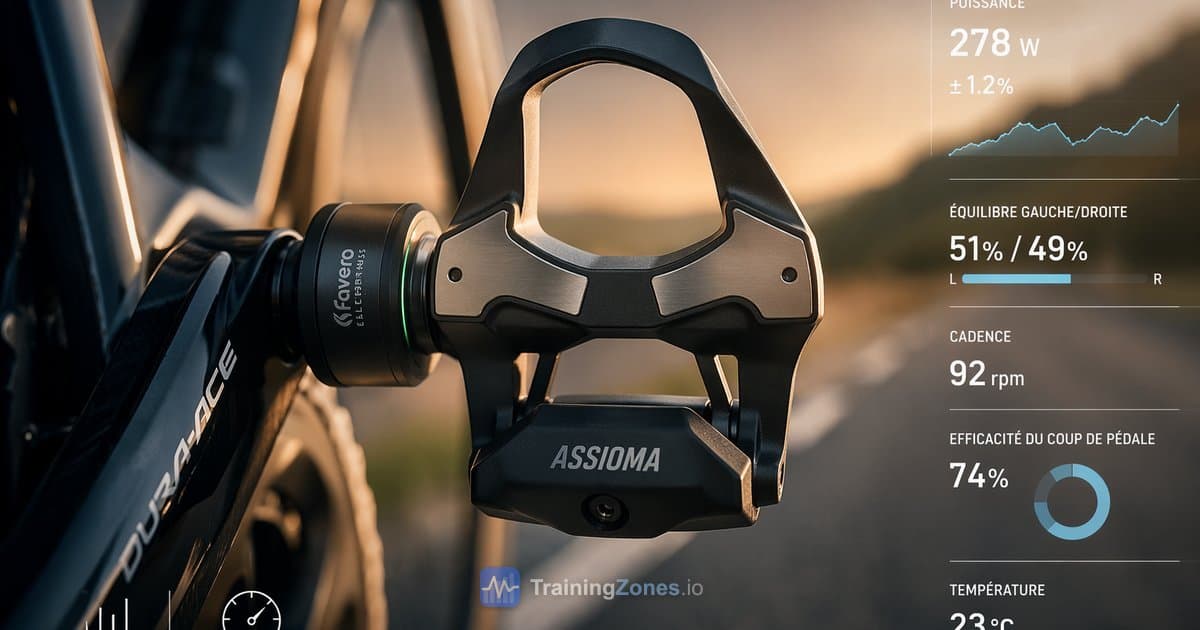
The three most common types of power meters are pedal-based (like the Favero Assioma), crank-based (like Stages), and spider-based (like Quarq). Each measures torque at a different point on the drivetrain, but all deliver the same fundamental data: your power in watts, updated every second.
If you have never trained with power before, think of it as a speedometer for your effort. Heart rate tells you how your body is responding. Power tells you what your body is actually producing. That distinction changes everything about how you train.
Why Train With Power Instead of Heart Rate?
Power meters respond instantly to effort changes while heart rate lags by 30 to 60 seconds. This makes power far superior for interval training, hill efforts, and race pacing. When you start a hard effort, your power meter reads 300W immediately, but your heart rate monitor still shows 130 bpm for the next minute.
Power vs Heart Rate: Response Time
Click the buttons below to simulate an interval workout
Power is also unaffected by external factors that distort heart rate. A hot day can raise your heart rate by 10 to 15 bpm at the same effort. Caffeine, stress, dehydration, and altitude all change heart rate without changing your actual output. Power stays the same regardless of conditions.
That said, heart rate monitors cost €30 to €100, while power meters range from €250 to €1,500. Heart rate is still valuable for monitoring fatigue and cardiovascular drift during long rides. The best approach is to use both: power to set your targets, heart rate to monitor your body's response.
Calculate your personalized training zones based on heart rate with our Heart Rate Zone Calculator.
How to Set Up and Calibrate Your Power Meter
Calibrating your power meter before every ride takes less than 30 seconds and ensures consistent data. Here is the step-by-step process:
- Mount the power meter on your bike and let it sit for 5 minutes at outdoor temperature
- Pair it with your bike computer via ANT+ or Bluetooth
- Open the sensor settings on your head unit and select "Calibrate" or "Zero Offset"
- Keep the cranks vertical at the 6 o'clock position with no weight on the pedals
- Press calibrate and wait for the confirmation number
- Record the offset number so you can spot drift over time
Why does this matter? Temperature changes cause the strain gauges inside the power meter to shift slightly. A 10°C difference between your garage and the road can cause a 2 to 5% error if you skip calibration. Calibrating at outdoor temperature eliminates this problem.
Pro tip: If your power numbers suddenly look 10 to 20W higher or lower than expected mid-ride, stop and recalibrate. A loose pedal or temperature swing may have caused zero-offset drift.
What Is FTP and How Do You Test It?
FTP (Functional Threshold Power) is the highest average power you can sustain for approximately one hour. It represents the boundary between aerobic and anaerobic effort. Every power-based training zone, workout target, and fitness benchmark is derived from your FTP.
The most common test protocol is the 20-minute test developed by Allen and Coggan (2010):
- Warm up for 20 minutes including 3 one-minute efforts at increasing intensity
- Ride 5 minutes hard to deplete anaerobic reserves
- Recover for 5 minutes with easy spinning
- Ride 20 minutes as hard as you can sustain evenly
- Cool down for 10 minutes
The formula: FTP = 20-minute average power × 0.95
For example, if your 20-minute average is 280W, your estimated FTP is 266W. For a 70 kg rider, that translates to 3.8 W/kg, which is a competitive amateur level.
Alternative protocols include the ramp test (increasing power by 20W per minute until failure, then multiplying the best one-minute power by 0.75) and the 2×8-minute test (two 8-minute efforts averaged and multiplied by 0.90).
Estimate your FTP using the free TrainingZones.io FTP Calculator, which supports all three test protocols and calculates your zones automatically.
Understanding Your 7 Cycling Power Zones
Once you know your FTP, you can calculate your 7 personalized power training zones using the Coggan model. Each zone targets a different physiological system and has a specific purpose in your training plan.
- Zone 1 — Active Recovery (below 55% FTP): Very easy spinning to promote blood flow without adding training stress. Use on rest days or between intervals.
- Zone 2 — Endurance (56 to 75% FTP): The foundation of aerobic fitness. Most of your training volume (roughly 80%) should be in this zone. Sustainable for 2 to 6 hours.
- Zone 3 — Tempo (76 to 90% FTP): Moderately hard effort that builds muscular endurance. Sustainable for 1 to 3 hours but generates more fatigue than Zone 2 for a relatively small additional benefit.
- Zone 4 — Lactate Threshold (91 to 105% FTP): Training at or near your FTP. This is the intensity that directly raises your FTP over time. Sustainable for 20 to 60 minutes.
- Zone 5 — VO2max (106 to 120% FTP): Hard intervals lasting 3 to 8 minutes that push your maximal oxygen uptake. The most effective zone for improving your VO2max.
- Zone 6 — Anaerobic Capacity (121 to 150% FTP): Very hard efforts lasting 30 seconds to 3 minutes. Develops your ability to produce power above threshold.
- Zone 7 — Neuromuscular Power (maximal): All-out sprints lasting under 30 seconds. Develops peak power and neuromuscular coordination.
A common mistake is spending too much time in Zone 3, also known as the "gray zone" or "no-man's land." This intensity is too hard to recover from quickly but not hard enough to drive significant adaptations. Research by Seiler (2010) showed that elite endurance athletes follow a polarized distribution: roughly 80% easy (Zones 1 to 2) and 20% hard (Zones 4 to 7).
Calculate your 7 personalized power zones using the free TrainingZones.io Power Zones Calculator.
Key Power Metrics: NP, IF, TSS, and W/kg
Beyond raw power, four derived metrics help you analyze your rides and manage your training load:
- Normalized Power (NP) is a weighted average that accounts for the physiological cost of variable effort. On a hilly or windy ride, your NP will be higher than your average power because surges are more costly than steady riding. NP always equals or exceeds average power.
- Intensity Factor (IF) is the ratio of NP to your FTP (IF = NP ÷ FTP). An IF of 1.0 means you rode at your FTP for the entire duration. An IF above 1.05 is a race-level effort. Use IF to compare rides of different durations.
- Training Stress Score (TSS) quantifies the overall training load of a ride. The formula is TSS = (duration in seconds × NP × IF) ÷ (FTP × 3600) × 100. A one-hour ride at FTP equals 100 TSS. Use weekly TSS totals to manage fatigue and prevent overtraining.
- Watts per kilogram (W/kg) is the universal metric for comparing cyclists regardless of body weight. Recreational cyclists typically produce 2.0 to 2.5 W/kg at FTP. Intermediate riders reach 3.0 to 3.5 W/kg. Competitive amateurs hit 4.0 to 4.5 W/kg. Professional cyclists sustain 5.5 to 7.0 W/kg (Allen and Coggan, 2019).
Example: You ride for 2 hours with NP of 200W and your FTP is 250W. IF = 200 ÷ 250 = 0.80. TSS = (7200 × 200 × 0.80) ÷ (250 × 3600) × 100 = 128 TSS. That is a moderately hard ride.
How to Read Your Power Data After a Ride
After every ride, your cycling computer or platform (Garmin Connect, Strava, TrainingPeaks) shows a power graph. Here is what to look for:
- Average power vs NP: A big gap between the two (high Variability Index) means your pacing was uneven. For time trials and steady efforts, aim for a VI below 1.05. For criteriums and mountain stages, a higher VI is normal.
- Power distribution: Check how much time you spent in each zone. Did you do what the workout prescribed? If your coach said "2 × 20 min at Zone 4" but you spent most of the time in Zone 3, you went too easy.
- Peak powers: Your best efforts at different durations (5 seconds, 1 minute, 5 minutes, 20 minutes) form your power profile. Tracking these over months reveals which areas are improving and where your weaknesses are.
- Decoupling: Compare the first and second half of a long ride. If your heart rate climbs while power stays flat (or power drops while HR stays flat), that is cardiac drift, a sign of dehydration or aerobic fitness limitations.
The most important habit is consistency. A single ride file tells you little. But 6 months of data reveals your training trajectory, your strengths, and the workouts that deliver the best results. The TrainingZones.io team recommends reviewing your power distribution weekly to ensure you are following the 80/20 rule.
How to Structure Training With a Power Meter
A power meter transforms vague training plans into precise, measurable workouts. Here is how to structure a typical training week for a cyclist with an FTP of 250W:
- Monday: Rest day or Zone 1 recovery spin (30 to 45 min, below 138W)
- Tuesday: VO2max intervals — 5 × 4 min at Zone 5 (265 to 300W) with 4 min recovery
- Wednesday: Zone 2 endurance ride (90 to 120 min, 140 to 188W)
- Thursday: Sweet Spot intervals — 3 × 15 min at 88 to 93% FTP (220 to 233W)
- Friday: Rest or easy Zone 1 spin
- Saturday: Long Zone 2 ride (3 to 4 hours, 140 to 188W)
- Sunday: Group ride or race simulation with Zone 4 to 5 efforts
This follows the 80/20 polarized distribution model that Seiler (2010) found in elite athletes. About 80% of your weekly training time is in Zones 1 to 2, and 20% is in Zones 4 and above. Zone 3 is used sparingly.
The key advantage of training with power is repeatability. When your coach prescribes "3 × 15 min at Sweet Spot," you know exactly what wattage to hit. No guessing, no relying on how you feel that day. You either hit the target or you did not.
Common Power Meter Mistakes Beginners Make
Common myth: you need dual-sided power measurement for accurate training. Reality: single-sided power meters measure one leg and double it. Most riders have less than 3% left-right imbalance. The difference only matters for biomechanical analysis or professional racing. For training zones and workout targets, a single-sided meter is accurate enough.
Here are the other mistakes to avoid:
- Chasing watts every ride. Not every ride is a test. Zone 2 rides should feel easy. If you are constantly checking your power and trying to go harder, you will burn out.
- Ignoring calibration. Skipping the 30-second calibration means your data could be off by 5 to 10%. Do it before every ride.
- Setting FTP too high. Many beginners estimate their FTP from a ramp test on a good day and then cannot complete prescribed workouts. If you consistently fail to hold Zone 4 intervals, your FTP is set too high. Retest.
- Comparing watts to other riders. A 200W effort means something different for a 60 kg rider (3.33 W/kg) than for a 90 kg rider (2.22 W/kg). Always use W/kg for comparisons.
- Never retesting FTP. Your FTP changes as fitness improves. Retest every 6 to 8 weeks during a training block.
- Training too much in Zone 3. The "gray zone" feels productive but is neither easy enough to recover from nor hard enough to drive big adaptations. Keep it below 10% of your weekly volume.
Power Meter Types: Pedals vs Crank vs Hub
There are four main types of cycling power meters, each measuring torque at a different point on the drivetrain:
- Pedal-based (Favero Assioma, Garmin Rally): Strain gauges inside the pedal spindle. Easiest to install and transfer between bikes. Available in single-sided or dual-sided. No compatibility issues with frame or crankset. The most popular choice for road cyclists.
- Crank arm (Stages, 4iiii): A strain gauge bonded to the left crank arm. Lightweight and affordable. Always single-sided, so it doubles the left leg measurement. Works with most cranksets.
- Spider-based (Quarq, SRAM AXS): Strain gauges in the spider that connects the chainrings to the crank. Always dual-sided and very accurate. More expensive and tied to a specific crankset standard.
- Hub-based (PowerTap): Strain gauges in the rear hub. Once popular but now largely discontinued. Cannot be transferred between wheelsets.
For most cyclists starting out, pedal-based power meters offer the best combination of accuracy, ease of installation, and bike-to-bike portability.
Our pick: The Favero Assioma Duo is widely considered the best value power meter in 2026. Dual-sided measurement, ±1% accuracy, rechargeable via USB-C, and easy installation on any road bike with Look Keo-compatible cleats. At around €400, it costs half the price of competing dual-sided options.
Best Power Meters for Beginners (2026)
Choosing your first power meter can feel overwhelming. Here are the four best options for beginners, sorted by value:
- Favero Assioma Duo (~€400): Dual-sided pedal power meter with ±1% accuracy. Rechargeable batteries lasting 50+ hours. The best value for serious training. Look Keo or Shimano SPD-SL compatible versions available.
- Stages L (Shimano 105) (~€250): Single-sided crank arm power meter. The most affordable entry point. ±1.5% accuracy. Easy to install on Shimano 105 R7000 cranksets. Good for riders on a tight budget.
- 4iiii Precision (~€300): Single-sided crank arm with ±1% accuracy. Very lightweight (only 9 grams added). Available for Shimano 105, Ultegra, and Dura-Ace cranksets.
- Garmin Rally RS200 (~€550): Dual-sided pedal power meter with ±1% accuracy. Seamless integration with the Garmin ecosystem. Uses replaceable CR1/3N batteries. Available in Look Keo, Shimano SPD-SL, and SPD versions.
If budget is your main concern, start with a Stages or 4iiii single-sided meter. You will still get accurate training zones and workout targets. If you can invest more, the Favero Assioma Duo gives you dual-sided data at a price that is hard to beat.
Whichever power meter you choose, the most important step is to test your FTP and calculate your zones. Use our free FTP Calculator to get started, then build your 7 personalized power zones with our Power Zones Calculator on TrainingZones.io.
Frequently Asked Questions About Power Meters
What is a good wattage for a beginner cyclist?
Average power output depends heavily on body weight and fitness. A recreational cyclist typically sustains 100 to 150 watts for steady riding. A more useful metric is watts per kilogram: 2.0 to 2.5 W/kg is beginner level, 3.0 to 3.5 is intermediate, and 4.0 or above is competitive. Use your FTP and body weight to find where you stand.
Do I need a power meter for cycling?
A power meter is not essential, but it is the most effective tool for structured training. If you follow a training plan, do intervals, or want to track fitness improvements objectively, a power meter is worth the investment. If you ride purely for fun without performance goals, a heart rate monitor may be all you need.
What is the difference between power and heart rate?
Power measures your actual mechanical output in watts. Heart rate measures your cardiovascular response. Power responds instantly, is unaffected by heat, caffeine, or fatigue, and provides objective targets for intervals. Heart rate lags by 30 to 60 seconds and fluctuates with external factors. Both are useful: power for setting targets, heart rate for monitoring your body.
How accurate are cycling power meters?
Most modern power meters claim ±1% to ±2% accuracy. In practice, the absolute accuracy matters less than consistency. If your power meter always reads 3% low, your training zones are still correct because they are based on your tested FTP using that same meter. Calibrate before every ride for the best results.
Can I use a power meter on a smart trainer?
Yes, but you have two options. You can use your bike's power meter while riding on the trainer, or use the trainer's built-in power measurement. If you use both, there will likely be a 2 to 5% difference between them. Pick one source and stick with it for FTP testing and workouts to keep your zones consistent.
How often should I test my FTP?
Retest your FTP every 6 to 8 weeks during a structured training block. Also retest after a significant break, illness, or whenever your prescribed workouts feel consistently too easy or too hard. Many platforms like Zwift and TrainerRoad offer auto-detected FTP updates based on your ride data, but a formal test remains more reliable.
References
- Allen H, Coggan A (2019). Training and Racing with a Power Meter (3rd ed.). VeloPress.
- Seiler S (2010). What is Best Practice for Training Intensity and Duration Distribution in Endurance Athletes? Int J Sports Physiol Perform, 5(3):276-291.
- Borszcz FK et al. (2018). Functional Threshold Power in Cyclists: Validity of the Concept and Physiological Responses. Int J Sports Med, 39(10):737-742.